
Precision Software Engineering

Digital solutions for real operational processes.

We build digital products and tailored software from real operational processes — for industrial automation, local service businesses and skilled trades.

Solution portfolio

Three proprietary and reference solutions, each built from real operational processes and shown at its current public stage.

  • Automation Assessment Platform

    Vendor-neutral assessment and decision platform for industrial automation

    Industrial engineering, operations, automation and procurement

    Structured, vendor-neutral analysis and decision support from real process data.

    AvailableView details
  • RightSlot

    Booking and management platform for local service businesses

    Local service businesses and their customers

    Bookings, availability and customer operations in one place.

    AvailableView details
  • AFR Smart Operations

    Operational management software for skilled trades and field-service businesses

    Skilled-trade and field-service businesses

    Planning, jobs, employees and documents in one system.

    Implemented referenceView details

Vendor-neutral decision platform

Available

Structured decisions for industrial automation.

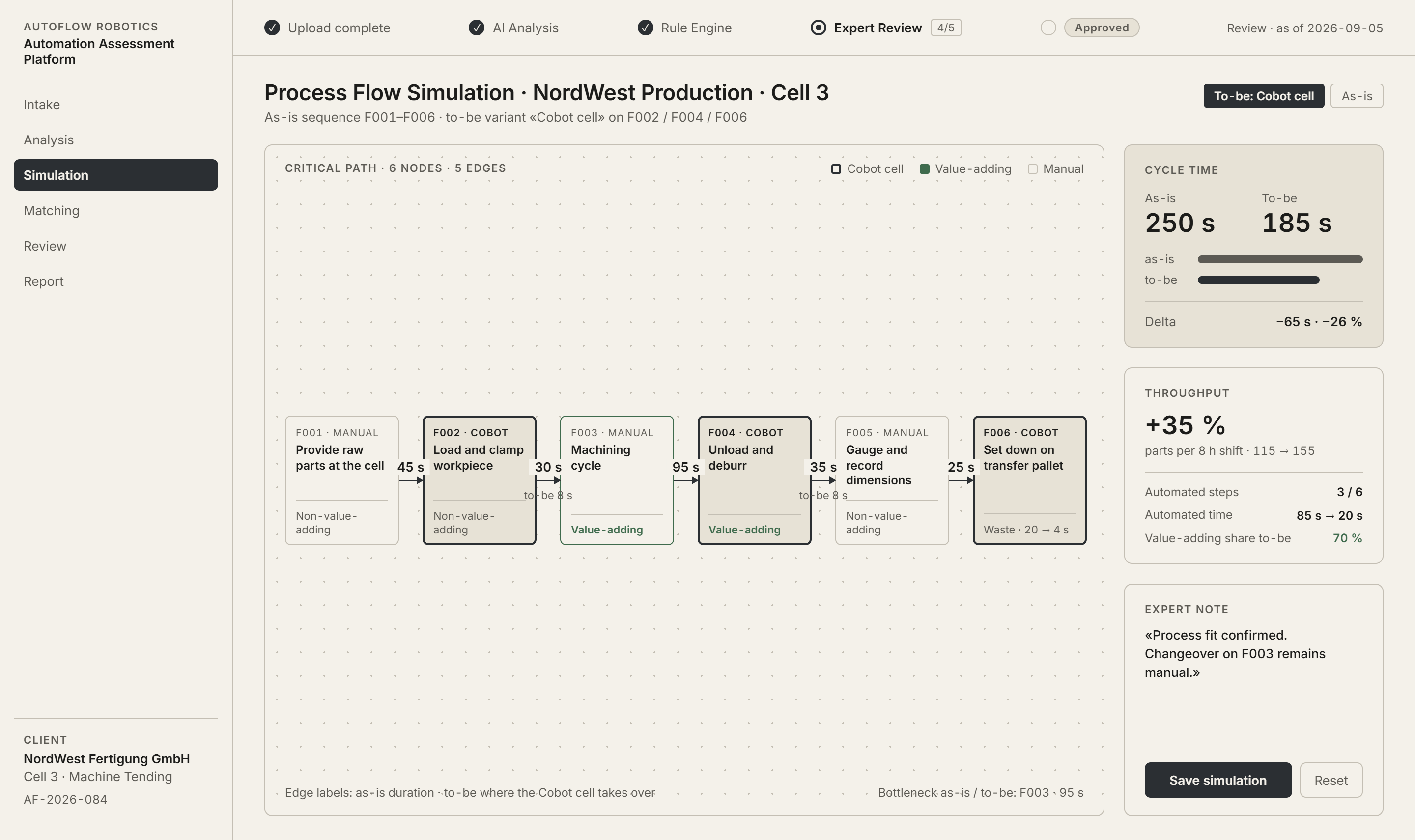
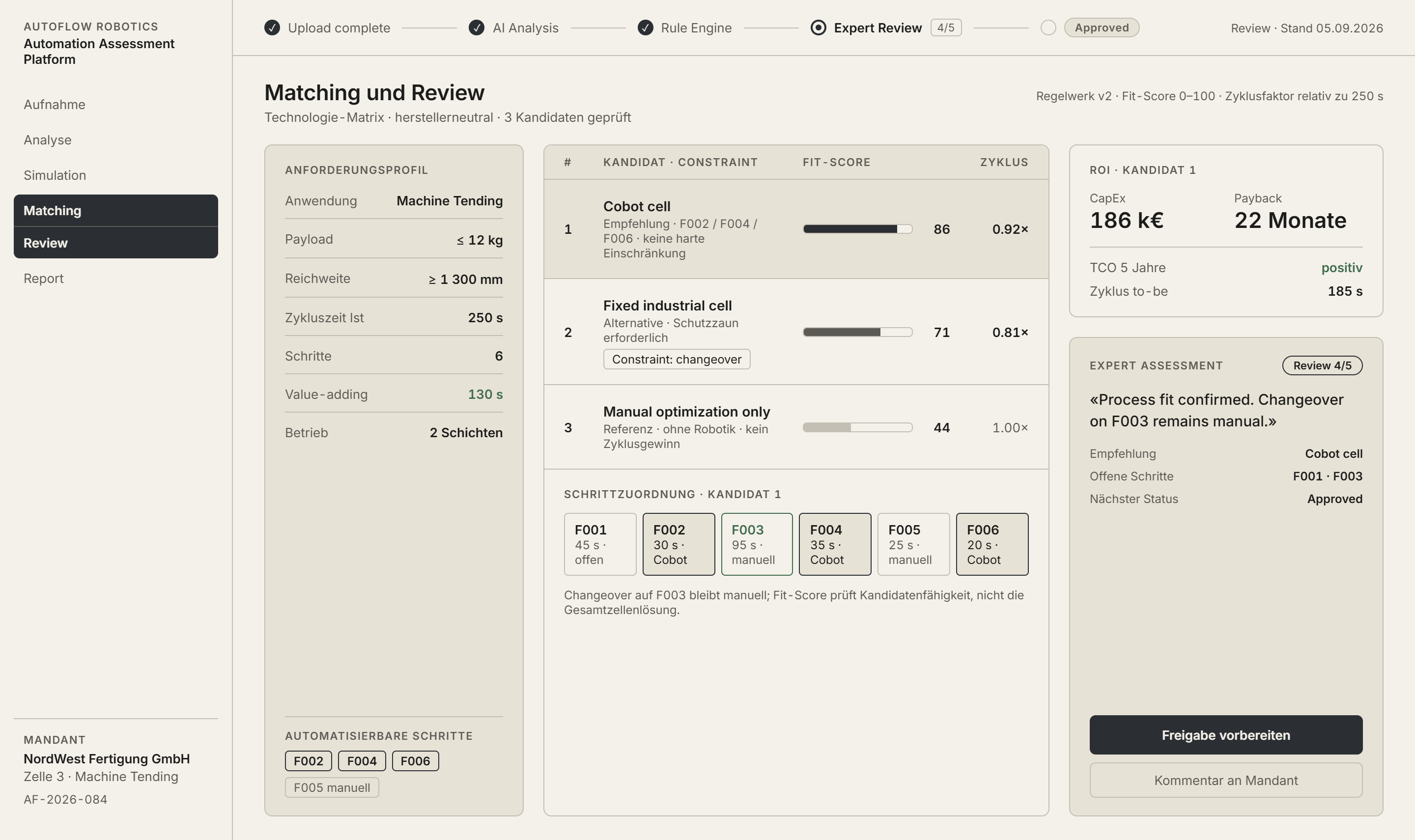
The Automation Assessment Platform captures real processes, structures requirements and combines assessment, simulation, solution matching and ROI/TCO analysis into a traceable basis for automation decisions.

Assessment sequence

  1. Upload complete
  2. AI Analysis
  3. Rule Engine
  4. Expert Review
  5. Approved

Process Analysis & Lean Metrics

Example process register: each process step with its as-is cycle time, lean classification and to-be automation state.
#Process stepAs-is timeCategoryTo-be / automation state
F001Process stepProvide raw parts at the cellAs-is time45 sCategoryNon-value-addingTo-be / automation stateNot set yet.
F002Process stepLoad and clamp workpieceAs-is time30 sCategoryNon-value-addingTo-be / automation stateCobot cell
F003Process stepMachining cycleAs-is time95 sCategoryValue-addingTo-be / automation stateNot set yet.
F004Process stepUnload and deburrAs-is time35 sCategoryValue-addingTo-be / automation stateCobot cell
F005Process stepGauge and record dimensionsAs-is time25 sCategoryNon-value-addingTo-be / automation stateManual optimization
F006Process stepSet down on transfer palletAs-is time20 sCategoryWasteTo-be / automation stateCobot cell
Total cycle time250 s
Steps6
Lean distribution (VA / NVA / Waste)
  • Value-adding 130 s
  • Non-value-adding 100 s
  • Waste 20 s

Decision output

  • Requirements Fulfillment (Tech-Check)
  • Technology Matrix
  • Requirement Profile (Detail)
  • Budget Transparency
  • Alternative Candidates
  • ROI Calculator
  • Expert Assessment

Sections of the decision-ready report a full assessment produces. Values depend on the assessed process.

How the platform turns a captured process into a structured, traceable automation decision. · Example assessment · illustrative values

What the platform does

  1. Process capture and decomposition

    Structured questionnaires, process parameters and process videos are captured and broken down into transparent, comparable process steps.

  2. Feasibility, rules and scenario assessment

    A rule engine assesses repetitiveness, variability and constraints, while interactive simulation compares alternative actor and task allocations, cycle time and throughput.

  3. Solution and vendor matching

    Weighted best-fit scoring matches requirements to suitable systems and vendors on a vendor-neutral basis, with side-by-side solution comparison.

  4. ROI/TCO, expert review and reporting

    Technical and economic suitability, ROI and TCO logic, expert review and a decision-ready report form a traceable basis for the investment decision.

Specialist modules — including a Mini Assessment and a Welding Automation Advisor — extend the platform for specific tasks without narrowing it to a single process.

Who it's for

Industrial and process engineering, operations, automation, procurement and management share one evidence-based basis for automation investment decisions.

Booking and management platform

Available

Booking and scheduling for local service businesses.

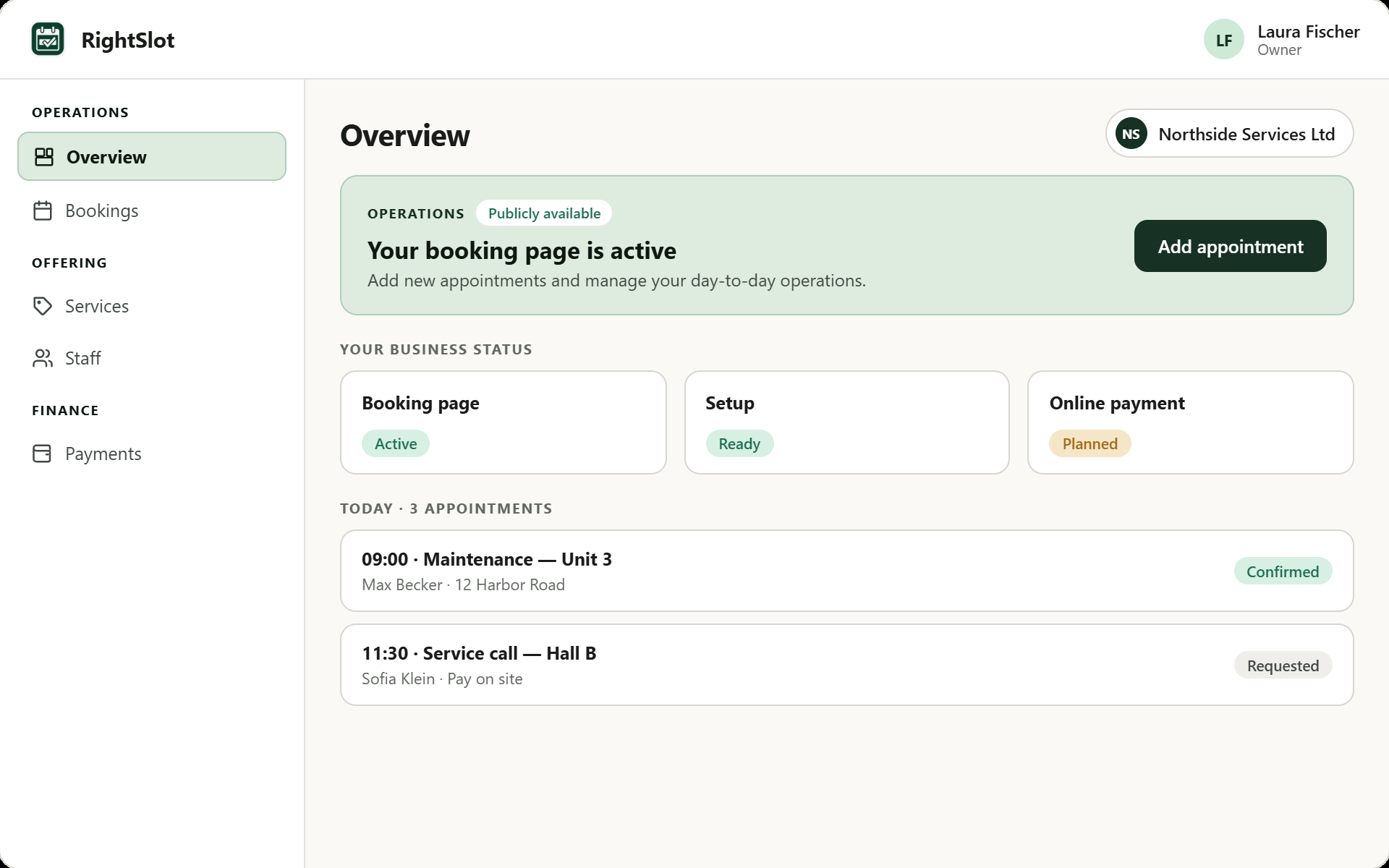
RightSlot brings together services, availability, online booking and booking operations in a clear, localized experience for providers and customers.

RightSlot booking page for a demo beauty salon with service selection, pricing and a guided booking flow.
Customer-friendly online booking with clear service information, pricing, duration and guided appointment selection. · German product interface

Providers and customers

  • For providers

    Providers can present services, maintain availability and organise bookings and day-to-day operations centrally — with a storefront, appointment overview and role-based administration.

  • For customers

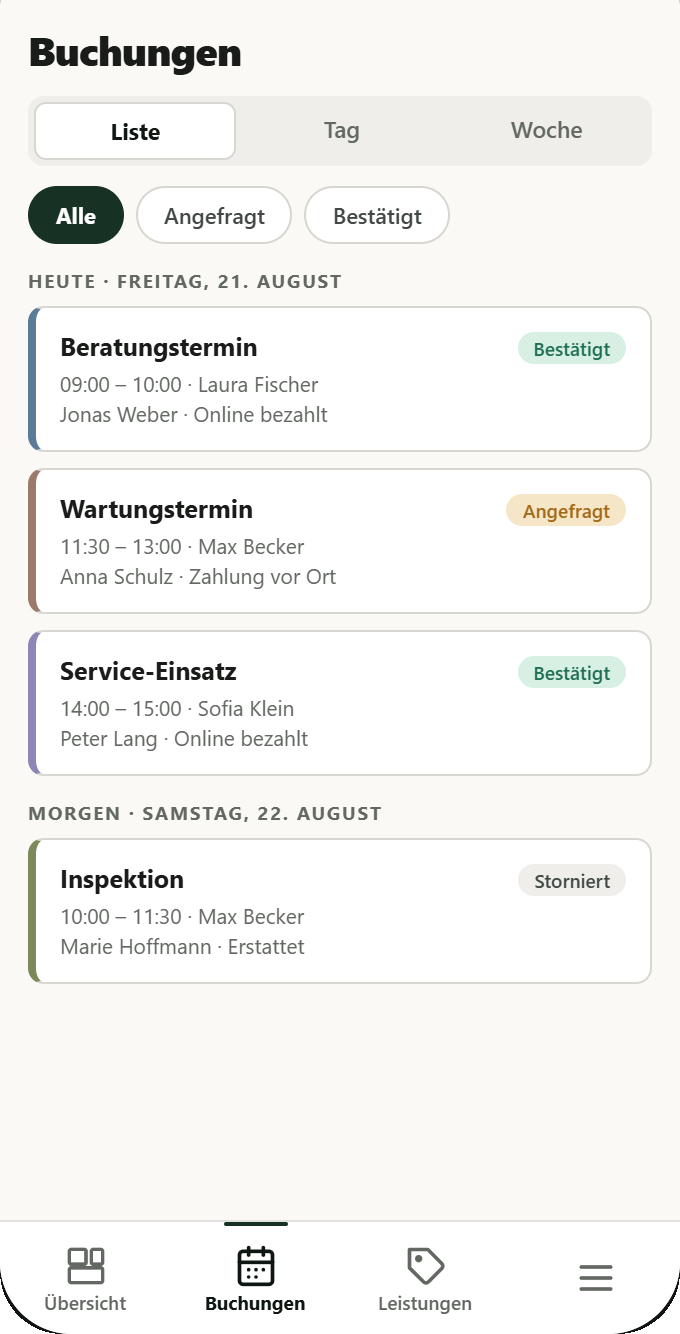
    Customers find services in the provider storefront, choose appointments in a clear, mobile-friendly and localized flow, and receive confirmations and booking communication.

What RightSlot brings together

  • Services and availability

    Present services and variants with pricing and duration; manage availability and calendars centrally.

  • Provider storefront and presentation

    Public provider profiles and storefronts with service and media presentation for local businesses.

  • Customer booking journey

    Online appointment booking in a clear, mobile-friendly and localized flow — from selection to confirmation.

  • Booking operations and communication

    Appointment overviews, employee and team assignment, and automated booking notifications and confirmations.

Who it's for

RightSlot is built for local service businesses with appointment-based services — from beauty and wellness to trades, cleaning, fitness, coaching and education — and for their customers, who want to book online with ease.

Operational management for skilled trades and field service

Implemented reference

AFR Smart Operations

Operational software for skilled trades and field-service businesses.

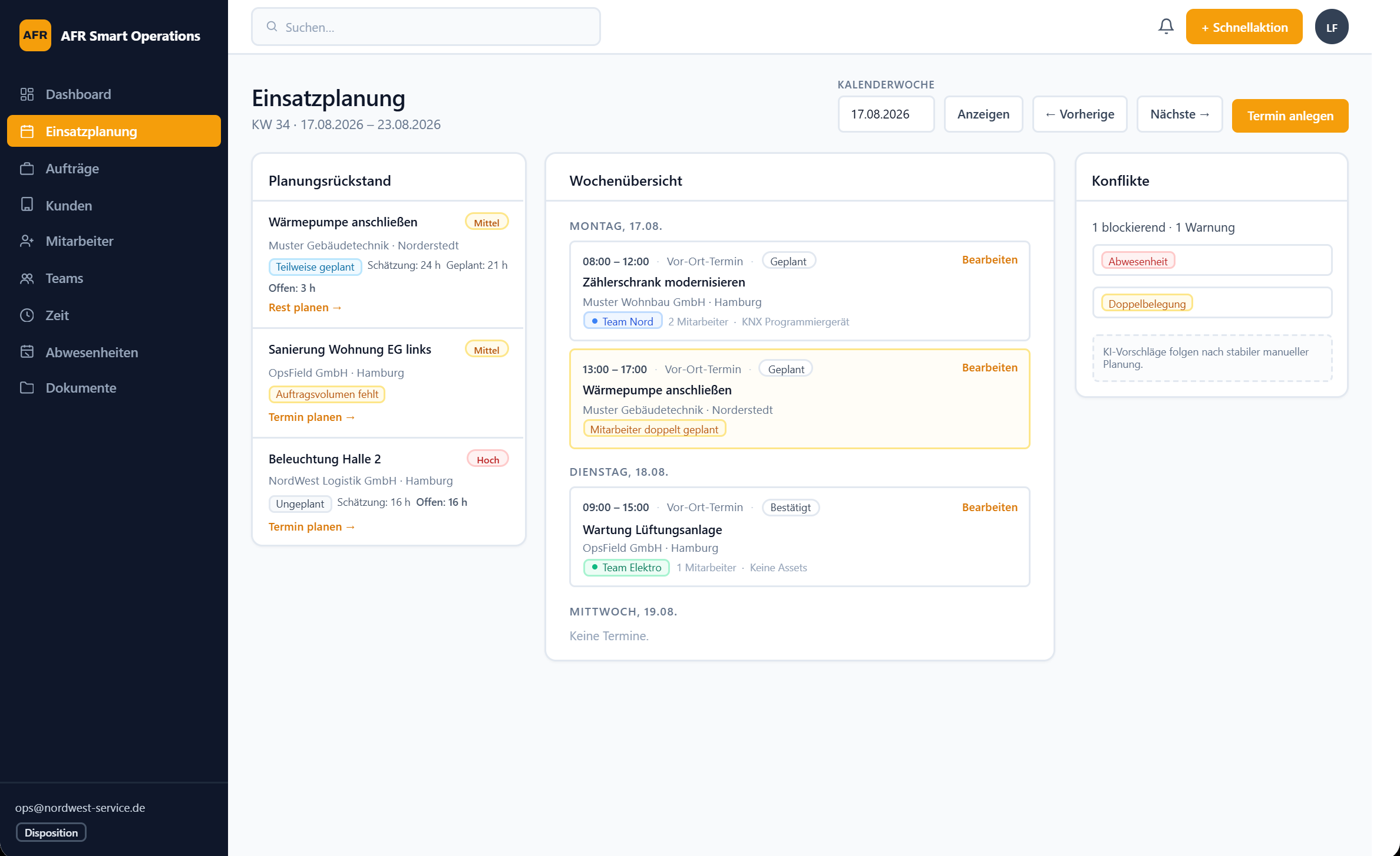
AFR Smart Operations brings together scheduling, jobs, customers, teams, working time and documents in a structured operational environment.

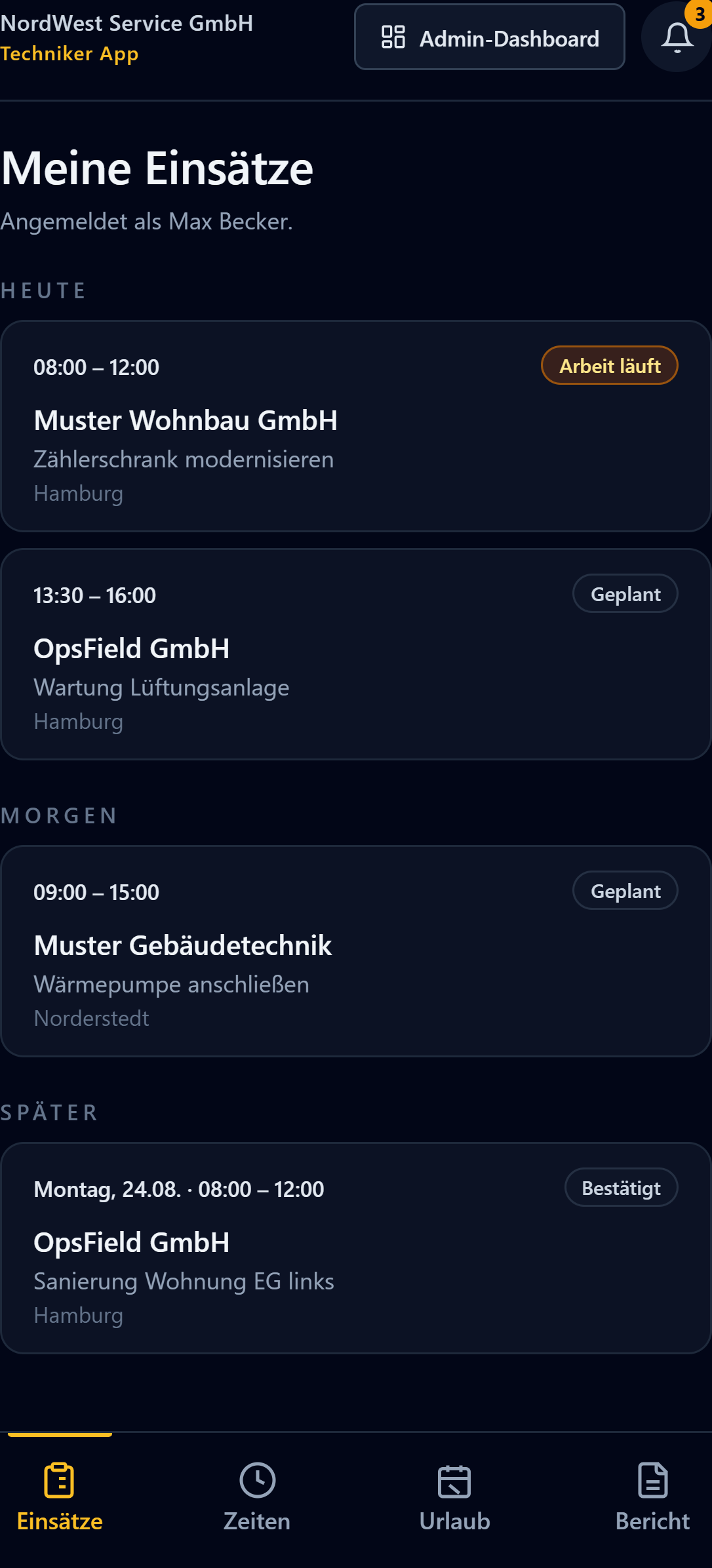
Operations workspace and technician app

Scheduling

Calendar week 38

Weekly schedule by team
Functional modulesMonTueWedThuFri
Installation team
07:3012:00Switchgear cabinet retrofitEast industrial parkConstruction siteCompleted
08:0015:30Sub-distribution board replacementNorth districtConstruction siteIn progress
07:3011:00Charging infrastructure installationWest districtConstruction siteScheduled
Service team
09:0011:30Electrical safety inspection, commercial unitWest districtMaintenanceCompleted
13:0014:30Hall lighting faultSouth harbourRepairEn route
08:0009:30Site visit, new buildNorth districtSite visitConfirmedEmployee unavailable

Unscheduled

  • Emergency lighting serviceSouth harbour
  • Portable appliance testingEast industrial park

Conflicts

Employee unavailable

Site visit, new build — Thursday

Appointments
6
Unscheduled
2
Conflicts
1

Technician app

Assignment

Sub-distribution board replacement

Wed · 08:0015:30

SiteNorth district

Construction siteIn progress

Progress

  1. Scheduled
  2. En route
  3. On site
  4. In progressCurrent status
  5. Completed

Finish work

Stops working-time capture.

Time capture

Travel time
35 min
Working time
3 h 10 min
Break
30 min
Total
3 h 45 min

Documents

  • On-site photoDistribution board, interim state
  • Voice noteQuery on material requirement
  • Assignments
  • Time
  • Leave
  • Report
Reconstructed system structure — no customer data · Example week

Implemented functional modules

  • Scheduling
  • Jobs
  • Customers
  • Employees
  • Teams
  • Time
  • Absences
  • Documents
  • Roles and administration
  • Mobile operations

Operational structure

  1. Plan operational work

    Scheduling and jobs form the basis for day-to-day operational dispatch.

  2. Coordinate jobs and teams

    Customers, employees, teams and absences feed into shared job coordination.

  3. Record time and documents

    Working time and job-related documents stay traceable in one operational environment.

  4. Support mobile execution

    Relevant operational functions are available in the field through a responsive interface.

  5. Govern access and administration

    Roles and administration keep administrative and operational access clearly separated.

Implementation reference

First implemented for AFG Elektrotechnik GmbH.

Who it's for

For skilled-trade businesses, field-service organisations, and dispatch, operations and administration teams — adaptable to each organisation's processes and structure, not an unchanged off-the-shelf product for every industry.

Working approach

Build software from real operational processes.

We do not begin with a feature list. We start with real workflows, roles, decisions and information flows. From that foundation, we build a structured software solution that can be tested in realistic conditions and refined deliberately.

  1. 01

    Understand operational reality

    We capture the real workflow — actors, constraints, decision points and information flows — and separate observed facts from assumptions.

  2. 02

    Structure the system

    Operational needs become requirements, domain objects, roles, states and system boundaries. Important decisions stay explicit and traceable.

  3. 03

    Build the usable workflow

    The core operational path is the priority. Interfaces and responsibilities stay clear; unnecessary complexity is avoided.

  4. 04

    Validate and evolve

    Behaviour is checked against realistic scenarios. Observed gaps drive deliberate refinement — without eroding system boundaries or product truth.

Engineering principles

  • Process before features

    The operational workflow shapes the software structure — not the other way around.

  • Traceable decisions

    Important product and system decisions remain explicit and reviewable.

  • Validation in realistic conditions

    Results and operational fit are checked against realistic workflows and edge cases.

  • Maintainable system boundaries

    Clear boundaries keep the system extensible and usable in day-to-day work.

The three solutions in the portfolio follow this shared approach — each derived from its specific operational context, not from a generic software template.

Contact

Let’s discuss your software initiative with structure.

Describe the operational process, the people involved and the objective the software should support. Together, we can assess the appropriate structure, system boundaries and next steps.

Useful context for an initial enquiry

  • Current process or workflow

    Which operational work should the software support — and how does it run today?

  • Users, roles and responsibilities

    Who plans, decides and works with the system day to day?

  • Intended outcome or decision need

    What result or decision should the software help enable?

  • Existing systems and relevant constraints

    Which systems, integrations or organisational boundaries already matter?

Suitable for enquiries about existing products, comparable operational software solutions and tailored software development. Not every enquiry becomes a project — first we clarify the appropriate scope together.